Greenhouse Gas Inventory Data Explorer
The Data Explorer is an interactive tool that provides access to data from the EPA's annual Inventory of U.S. Greenhouse Gas Emissions and Sinks and the Inventory of U.S. Greenhouse Gas Emissions and Sinks by State. You can use the tool to create customized charts or maps, examine trends over time, and download data. Visit other EPA pages to learn more about the EPA's national Inventory and how it relates to EPA's Greenhouse Gas Reporting Program and the EPA's state-level greenhouse gas (GHG) data. The EPA recognizes that there will be differences between the EPA's state-level GHG estimates and some inventory estimates developed independently by individual state governments. Inventory data presented here should not be viewed as official data of any state government. Additional information is available on official state GHG data, where it exists, including information on potential areas of difference between EPA's data and official state data.
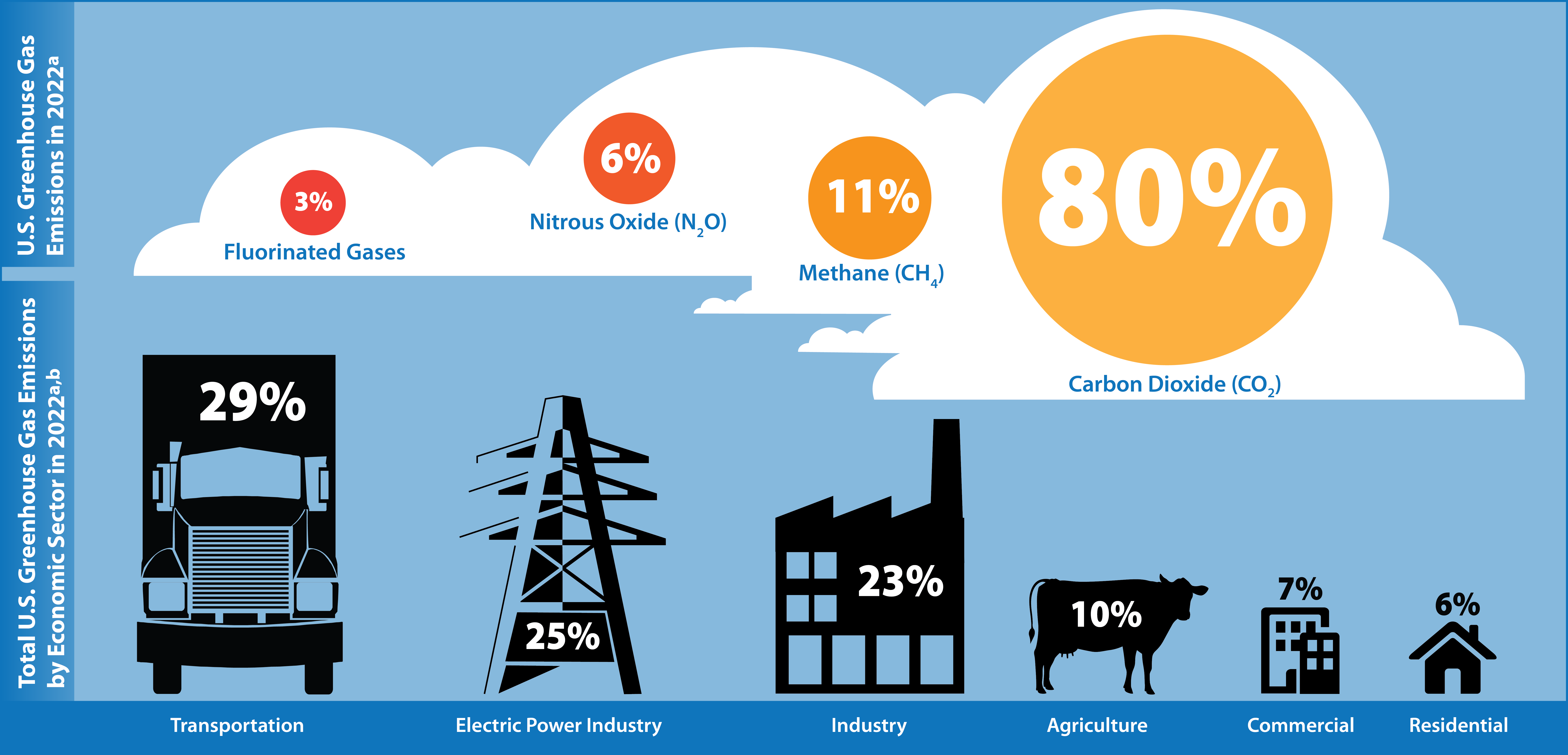 aPercentages may not add to 100% due to independent rounding and
the way the inventory quantifies U.S. territories (not shown) as a separate
sector. Percentages are based on gross total emissions excluding emissions
and removals from the land use, land use change and forestry sector.
bGreenhouse gas emissions from some economic sectors, i.e.,
commercial and residential and industry increase substantially when emissions
from electricity end-use are distributed to end-use economic sectors to power
buildings (e.g., heating, ventilation, and air conditioning; lighting; and
appliances) and powering industrial machinery. EPA is working to include this
view of economic sectors where the electric power sector emission are
distributed to end-use sectors so it shows both direct and indirect emissions
(i.e. from electricity) to complement the current view showing electric power
sector as a distinct sector and direct emissions from each economic end-use
sector.
aPercentages may not add to 100% due to independent rounding and
the way the inventory quantifies U.S. territories (not shown) as a separate
sector. Percentages are based on gross total emissions excluding emissions
and removals from the land use, land use change and forestry sector.
bGreenhouse gas emissions from some economic sectors, i.e.,
commercial and residential and industry increase substantially when emissions
from electricity end-use are distributed to end-use economic sectors to power
buildings (e.g., heating, ventilation, and air conditioning; lighting; and
appliances) and powering industrial machinery. EPA is working to include this
view of economic sectors where the electric power sector emission are
distributed to end-use sectors so it shows both direct and indirect emissions
(i.e. from electricity) to complement the current view showing electric power
sector as a distinct sector and direct emissions from each economic end-use
sector.